A NATIVE WORKSPACE FOR THE WAY YOU BUILD

Less switching.
More making.

Your agents, code, and context. Finally together.
A calmer place to take your next idea all the way.

Built with Rust & GPUI · Open source · Yours to make your own
Placeholder video poster showing an illustrated Devcroft workspace. The real app recording will appear here.
VIDEO POSTER PLACEHOLDER
A closer look at your next workspace.DEMO RECORDING COMING SOON

THE AGENTS YOU KNOW. A WORKSPACE YOU’LL LOVE.

Claude Code
Codex
OpenCode
Oh My Pi
A LITTLE LESS FRICTION

Stay close to the work.

From the first prompt to the final review,
everything belongs to the same conversation.

01 / BUILD WITH YOUR AGENT

Your favorite agent.
A place to pick up.

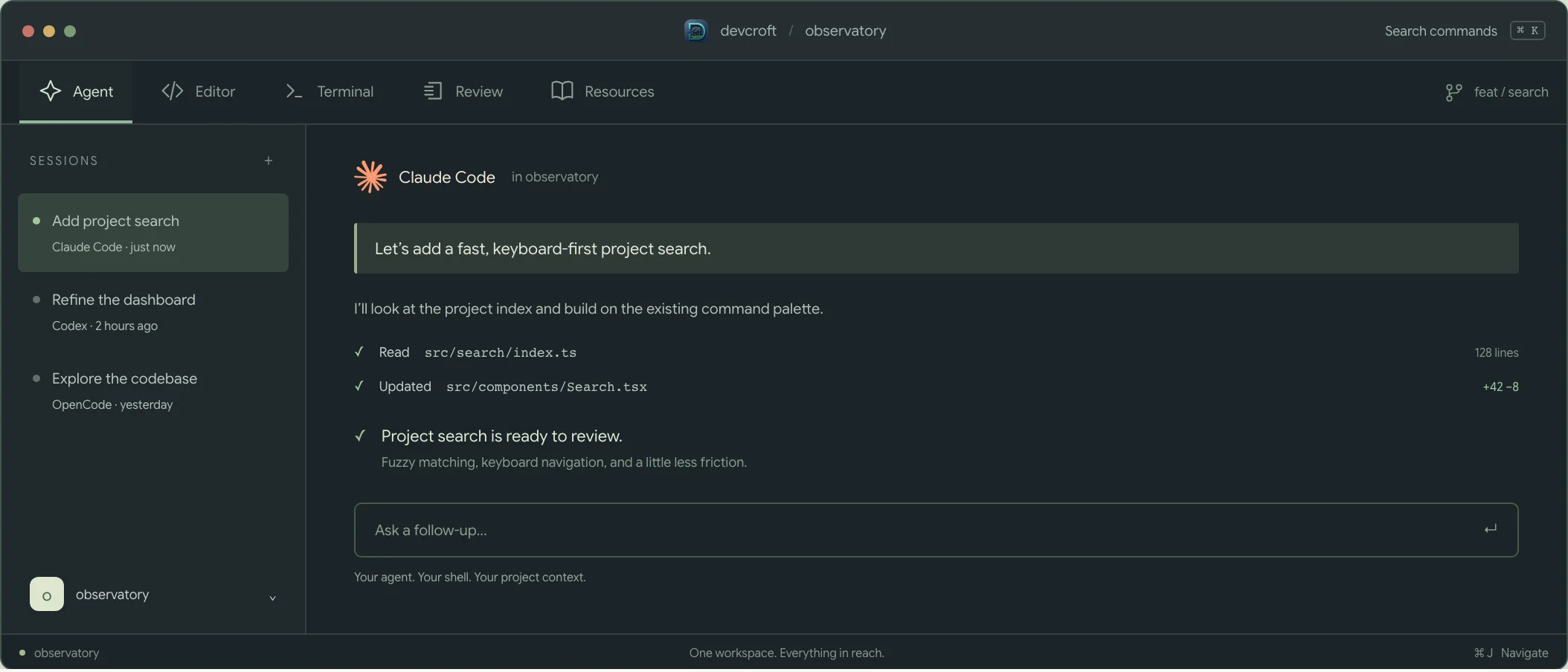
Bring Claude Code, Codex, OpenCode, or Oh My Pi. Resume a project’s recent session or start fresh with the harness that fits the task.

Your familiar shell environment comes along. Your sessions stay alive as you move through the workspace.

Meet your new workspace
Your agent, in contextSCREENSHOT PLACEHOLDER
  1. Pick up a previous session
  2. Keep your tools in reach
Illustrative preview · real app capture to follow

Your agent, in context

Illustrative placeholder · not a real app capture

Placeholder illustration of agent sessions beside an active coding conversation.
  1. Pick up a previous session
  2. Keep your tools in reach
02 / CLOSE THE FEEDBACK LOOP

Review the change.
Keep the conversation.

Read a syntax-highlighted diff. Leave a comment on a line or a range. Let your agent pick up that feedback directly through the Devcroft CLI.

Comments stay with their branch pair and scope, so your feedback has a home beyond the chat.

A closer look at review
Feedback that stays with the codeSCREENSHOT PLACEHOLDER
  1. See exactly what changed
  2. Leave feedback for your agent
Illustrative preview · real app capture to follow

Feedback that stays with the code

Illustrative placeholder · not a real app capture

Placeholder illustration of a code diff with a saved line comment.
  1. See exactly what changed
  2. Leave feedback for your agent
03 / GIVE CONTEXT A HOME

The thinking behind
the code.

Plans, RFCs, notes, reviews, and visual tutorials live alongside their repository. Read them, refine them, and return to the agent session where they began.

Your agent can create resources and read comments through the same CLI. Good context doesn’t have to get lost in a scrollback.

Explore repository resources
The context behind the changeSCREENSHOT PLACEHOLDER
  1. Keep plans beside the project
  2. Return to the original session
Illustrative preview · real app capture to follow

The context behind the change

Illustrative placeholder · not a real app capture

Placeholder illustration of repository resources and an implementation plan.
  1. Keep plans beside the project
  2. Return to the original session
THE BIG PICTURE, WITHIN REACH

A home for all of it.

Multiple projects. Different contexts.
One thoughtful place to start your day.

A clear place to startSCREENSHOT PLACEHOLDER

A clear place to start

Illustrative placeholder · not a real app capture

Placeholder illustration of recent projects and a project todo list.

Start with a little clarity.

Recent projects, pull requests, todos, and things to read. Separate work and personal projects with Spaces, or see everything together.

See the connectionsSCREENSHOT PLACEHOLDER

See the connections

Illustrative placeholder · not a real app capture

Placeholder illustration connecting shared-api to backend and dashboard repositories.

See how the pieces connect.

Map providers and consumers on a repository canvas. Give each project a purpose, and let agents query the relationships through the CLI.

THE EVERYDAY ESSENTIALS

Feels familiar.
Flows better.

An editor that fits the moment.

Make a quick change in the built-in editor, settle into Neovim, or open your checkout in Zed or VS Code.

Your shell, right at home.

Independent terminal sessions keep running as you switch tabs, with your aliases, environment, and tools intact.

Keep your hands on the keys.

Jump between projects, find a file, or navigate your workspace with command palettes and a dedicated navigation mode.

A few keys. A lot less reaching.
⌘ K Commands
⌘ P Projects
⌘ J Navigation
Use Ctrl on Linux.
Devcroft app icon
MAKE ROOM FOR YOUR NEXT IDEA

Your work.
A little more together.

A native workspace, built with care.
Open source, and ready to become part of your flow.

Release downloads are coming soon. These are preview links.

Build from source in the meantime

A few things to know.

Does Devcroft include an AI model?+

Devcroft brings your existing coding agents into a shared workspace. Install and authenticate Claude Code, Codex, OpenCode, or Oh My Pi separately. Your chosen agent manages its own models and subscriptions.

Can I keep using my editor?+

Yes. Choose the built-in editor for small edits or Neovim for your familiar workflow. You can also enable installed Zed or VS Code launchers to open the checkout externally.

Where does my project context live?+

Devcroft stores its records locally. Portable records, including resources and dashboard items, can sync through Git. Your chosen coding agent has its own data handling settings.

Is Devcroft open source?+

Yes. Devcroft is licensed under MIT. Explore the code, build the app, or contribute on GitHub.